N10 import declaration: the complete field-by-field guide
Bruce·22 Apr 2026·9 min read
The N10 is Australia's standard import declaration form, used to declare commercial goods to the Australian Border Force (ABF). It's lodged electronically through the Integrated Cargo System (ICS), and every commercial import with a customs value over $1,000 AUD requires one. The N10 tells ABF what you're importing, where it's coming from, what it's worth, and what duty and taxes apply. Get it right and your goods clear quickly. Get it wrong and you're looking at delays, penalties, or both.
This guide walks through the N10 field by field, explains what ABF actually cares about in each section, and covers the mistakes that trip up even experienced importers.
When you need an N10
Any commercial import into Australia with a customs value above $1,000 AUD (FOB) requires a formal import declaration, which is the N10. Below that threshold, goods can enter under an informal clearance (sometimes called a Self Assessed Clearance or SAC), which is a simplified process with fewer fields and no duty assessment.
In practice, most shipments by sea or air are well above $1,000, so the N10 is the default for commercial importers. You can lodge it yourself if you have direct ICS access, but the vast majority of importers use a licensed customs broker. Brokers lodge on your behalf using their ICS credentials and your importer details.
Timing matters. You can lodge an N10 up to 30 days before the vessel's estimated arrival. Goods cannot be released from the port until the declaration is processed and any duties are paid. If the N10 isn't lodged before the vessel berths, your containers sit at the terminal accumulating storage charges while you wait. Most brokers aim to have the declaration processed before arrival so the goods are pre-cleared.
The key fields explained
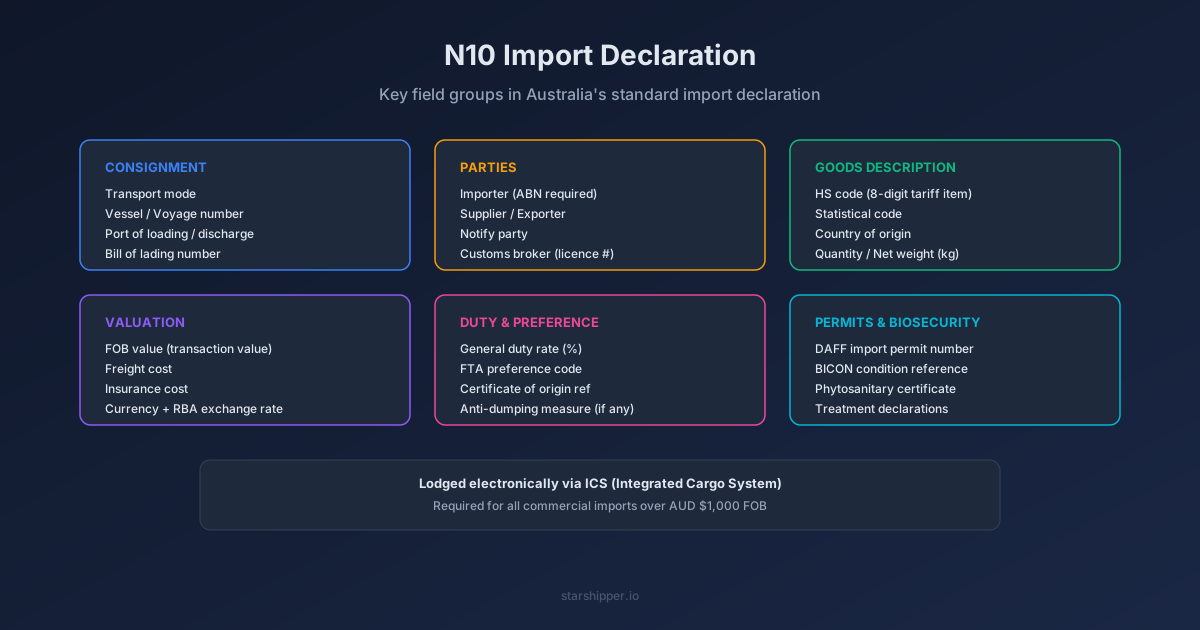
The N10 has dozens of fields, but they group into six logical sections. Here's what each one means and why it matters.
Consignment details
These fields describe how and where the goods are moving. Transport mode specifies sea, air, or post. Vessel name and voyage number identify the specific sailing (or flight number for air cargo). Port of loading is where the goods were put on the vessel, and port of discharge is where they arrive in Australia, both expressed as UN/LOCODE port codes like CNSHA for Shanghai or AUBNE for Brisbane.
The bill of lading number (or air waybill number) ties the declaration to the physical cargo. ABF uses this to match your declaration to the cargo report lodged by the shipping line or airline. If the B/L number on your N10 doesn't match the cargo report, the system can't link them and the goods won't clear.
Parties
Four parties appear on the N10. The importer is the entity bringing goods into Australia, identified by ABN. The supplier (or exporter) is the overseas seller. The notify party receives arrival notifications from the shipping line. And the customs broker is the licensed agent lodging the declaration.
The importer's ABN is critical. ABF uses it to check compliance history, apply any existing undertakings, and verify that the entity is registered for GST. If you're a first-time importer, make sure your ABN is registered with ABF before your goods arrive.
Goods description
This is where the detail lives, and where most errors happen. Each line of goods on the N10 needs its own tariff classification, which is the 8-digit code from Australia's Customs Tariff Schedule that identifies exactly what the product is. The first six digits follow the international Harmonised System, and the last two are Australia-specific statistical suffixes.
Along with the tariff code, each line needs the country of origin (where the goods were manufactured, not where they were shipped from), the quantity in the unit specified by the tariff schedule (which might be kilograms, litres, square metres, or number of items depending on the product), and the gross and net weight in kilograms. The HS code classifier can help you find the right classification if you're not sure where a product falls.
Valuation
ABF needs to know what the goods are worth in Australian dollars. The FOB value (Free on Board) is the starting point: the price of the goods at the port of export, excluding international freight and insurance. If your invoice is in a foreign currency, ABF converts it using Reserve Bank of Australia exchange rates on the date of export.
You also declare the freight cost (what you paid to ship the goods to Australia) and the insurance cost. The FOB value is the customs value, and duty is calculated on it. Add the duty, freight and insurance and you have the VoTI (Value of the Taxable Importation), which is the base for GST. You can estimate your total landed cost including duty and GST using the landed import cost calculator.
Adjustments cover things like royalties, licence fees, or buying commissions that need to be added to the transaction value under the WTO Valuation Agreement. The currency code and exchange rate used for conversion must also be declared. If you've used the wrong Incoterms basis, like declaring a CIF value in the FOB field, ABF will query the declaration and your clearance stalls.
Duty and preference
Each tariff line shows the applicable general duty rate (usually 0% or 5% for most goods), but you can claim a lower rate if the goods qualify under a Free Trade Agreement. Australia has FTAs with China (ChAFTA), Japan (JAEPA), Korea (KAFTA), ASEAN (AANZFTA), the UK (A-UKFTA), and several others.
To claim a preferential rate, you select the appropriate FTA preference code on the N10 and must hold a valid certificate of origin or declaration of origin from the supplier. ABF can request this at any time, and if you can't produce it, you'll be reassessed at the general rate plus interest. The import duty guide explains how duty rates and FTA preferences work in more detail.
Permits and biosecurity
Some goods require import permits before they can enter Australia. If your product is food, timber, plant material, animal products, or falls under other biosecurity categories, you'll need a permit number issued by the Department of Agriculture, Fisheries and Forestry (DAFF). The N10 includes fields for the permit number and the BICON reference (Biosecurity Import Conditions system) that identifies the specific import condition applicable to your goods.
Other permits might include ABF permits for prohibited and restricted imports, DAFF import permits for biosecurity goods, or therapeutic goods notifications from the TGA. Missing a required permit doesn't just delay clearance. It can result in the goods being held for inspection, directed for treatment, or refused entry entirely.
Common mistakes that delay clearance
Five errors account for the majority of N10 rejections and referrals.
Wrong HS classification is the most common. Classifying a product under the wrong heading can change the duty rate, trigger different permit requirements, or flag the declaration for manual review. A stainless steel kitchen sink classified under 7324 (sanitary ware) attracts 5% duty, but classified under 7326 (other articles of iron or steel) it might attract a different rate. The difference between headings often comes down to the product's primary function, not what it's made of. Read the HS code guide if you're unsure about your classification.
Mismatched values happen when the FOB amount on the N10 doesn't match the commercial invoice, or when freight and insurance figures don't reconcile with the shipping documents. ABF's system cross-references these numbers and flags discrepancies automatically.
Incorrect Incoterms cause valuation errors. If your invoice terms are CIF but you enter the CIF amount as the FOB value, you've overstated the FOB and your duty calculation is wrong. Always check which Incoterms your invoice uses and adjust the N10 values accordingly.
Missing FTA documentation trips up importers who claim preferential rates without holding the required certificate of origin. You don't need to submit it with the N10, but you must have it on file. ABF audits these retrospectively, sometimes years later.
Wrong country of origin is particularly common with goods that are manufactured in one country but shipped from another. A product assembled in Vietnam but transhipped through Singapore has Vietnam as its country of origin, not Singapore. The country of origin determines the duty rate, the applicable FTA, and the biosecurity risk profile.
N10 vs N20 vs N30
The N10 isn't the only import declaration type. Two others cover specific situations in the customs clearance process.
The N20 is a warehouse declaration. It's used when imported goods are moved directly into a licensed customs bonded warehouse without paying duty or GST at the point of import. The duty obligation is deferred until the goods leave the warehouse. This is common for distributors who import large quantities and release stock gradually, or for goods in transit to another country.
The N30 is an ex-warehouse declaration. It's lodged when goods are withdrawn from a bonded warehouse for entry into the Australian market. At this point, duty and GST become payable based on the goods' value and classification at the time of withdrawal. Think of it as a two-step process: N20 puts goods into the warehouse duty-free, N30 takes them out and settles the tax.
Most standard imports use only the N10. You'll encounter N20s and N30s if you're using bonded warehousing as part of your supply chain, which is more common with high-value or high-volume imports where cash flow management matters.
How StarShipper handles N10 generation
StarShipper reads your shipping documents (commercial invoices, packing lists, bills of lading) and extracts the fields needed for an N10 automatically. When a document set is uploaded, the system identifies the parties, classifies the goods, captures weights and values, and maps everything to the N10 field structure.
The extracted data goes through a cross-checking process that compares values across documents before anything is lodged. If the invoice amount doesn't match across documents, or the container numbers on the packing list don't line up with the bill of lading, you'll see a warning before it becomes a problem at ABF's end.
From there, the completed N10 can be exported in ICS-compatible format or sent directly to your TMS (like CargoWise or Expedient) for lodgement. The goal is to catch the data errors here, in your office, rather than after the declaration has been submitted and ABF has flagged it for review.
See it work on your documents
Forward a commercial invoice or bill of lading to your StarShipper inbox — every field extracted and validated in seconds.