Ocean freight tracking: how container tracking actually works
Bruce·15 Jan 2026·8 min read
Every container on an ocean vessel can be tracked from the moment it enters a port gate to the moment it leaves at the other end. The data behind that tracking comes from three different sources: shipping line milestones, terminal operating systems, and satellite-based vessel positions. Each source tells you something different, each has its own delays and blind spots, and understanding how they work together is the difference between knowing where your cargo is and just hoping it shows up on time.
The three data sources
Carrier milestones are status updates published by the shipping line. When MSC or Maersk or ONE update their systems, they emit events like "gate in at CNSHA" or "loaded on vessel" or "discharged at AUMEL". These milestones are the backbone of container tracking. They're authoritative (the carrier is the source of truth for what happened to the container) and they cover the full journey from origin to destination. The catch is timing. Carriers update their systems in batches, often 12 to 48 hours after the physical event. A container might be sitting on the wharf at Melbourne for a full day before the carrier's system shows "discharged". For importers watching a dashboard, that delay can be frustrating.
Terminal events come from the port or terminal operator rather than the shipping line. Container terminals run sophisticated operating systems (Navis N4, TOPS, etc.) that track every container move in real time: crane lifts, yard placement, reefer plug-ins, truck appointments. When a terminal publishes this data, it's far more granular and more timely than carrier milestones. The problem is availability. Not every terminal shares data externally, and the ones that do often use different formats and access methods. In Australia, Patrick and DP World terminals publish container availability data, but the depth of detail varies by port and operator.
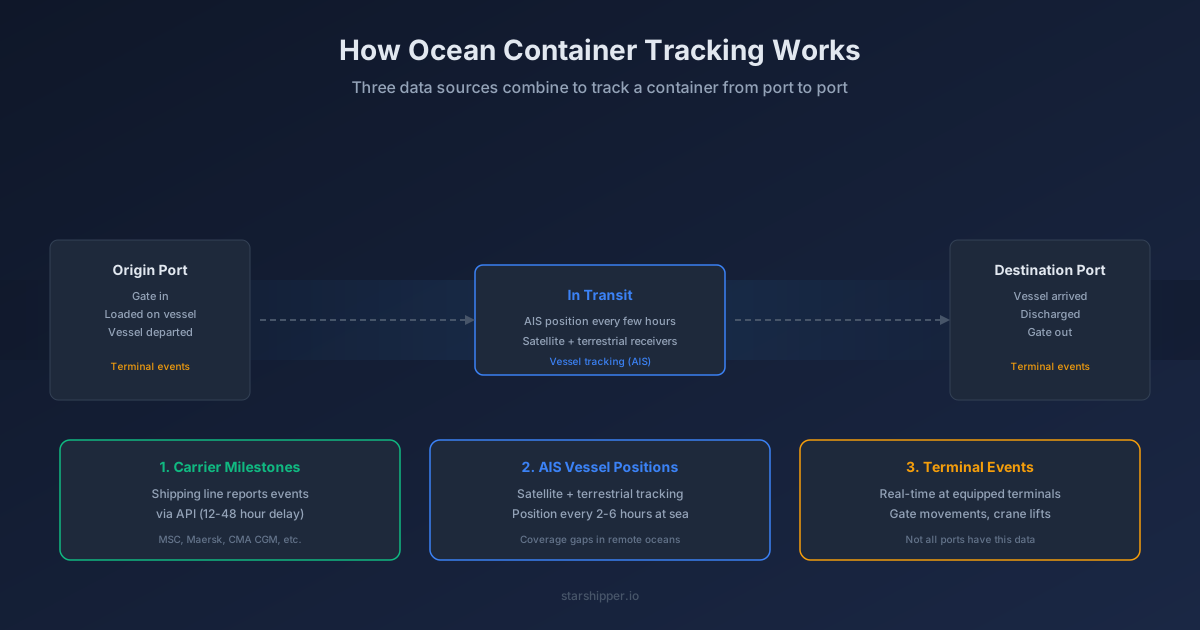
AIS vessel positions are the third piece. AIS (Automatic Identification System) is a transponder system required on all commercial vessels over 300 gross tonnes. Ships broadcast their position, speed, heading, and identity every few seconds. Shore-based receivers pick up these signals within about 50 nautical miles of the coast, and satellites fill in the gaps at sea. The result is a near-continuous track of every vessel on the ocean. AIS tells you where the ship is right now, which is something carrier milestones can't do mid-voyage. But AIS only tracks the vessel, not the container. If your container was transshipped at Singapore and is now on a different vessel, AIS positions for the first ship won't help you.
What the tracking milestones mean
Most importers never see what happens between a container being unloaded at the wharf and a truck picking it up for delivery. There are five distinct steps, each with its own agency and system. Here's the full sequence from origin to destination:
| Milestone | What actually happened | Typical timeframe |
|---|---|---|
| Gate in | Container entered the origin terminal by truck or rail | 1-5 days before vessel departure |
| Loaded | Crane lifted the container onto the vessel | Day of departure or day before |
| Departed | Vessel left the port of loading | Actual departure time |
| In transit | Vessel is at sea between ports | Days to weeks depending on route |
| Arrived | Vessel arrived at the destination port anchorage or berth | Actual arrival time |
| Discharged | Crane lifted the container off the vessel onto the wharf | Hours to 2 days after vessel arrival |
| Gate out | Container left the terminal on a truck or rail for delivery | After customs clearance and transport booking |
The gap between "arrived" and "discharged" is one of the most misunderstood parts of the journey. A vessel arriving at Port Botany doesn't mean your container is available. The ship might sit at anchor waiting for a berth. Once berthed, it might take 24 to 48 hours to discharge all containers, and yours could be near the bottom of the stack. Then there's customs hold, biosecurity inspection, and terminal storage before a truck can collect it.
The gap between "discharged" and "gate out" is equally opaque. Your container might be cleared by customs but sitting in the terminal yard because no transport has been booked. Or it's under a biosecurity hold that the carrier milestone system doesn't know about. This is where terminal-level data becomes valuable, because carrier milestones typically jump straight from "discharged" to "gate out" with nothing in between. You can look up your port of discharge to check terminal operator details and contact information.
Why tracking data is sometimes wrong
Carrier data delays are the most common issue. A container discharged on Tuesday might not show as discharged until Wednesday afternoon or Thursday morning. The shipping line's local agent updates their system when they get around to it, and that update propagates through EDI messages to tracking platforms. For time-sensitive cargo, 48 hours of ambiguity is a lot.
Port congestion makes ETAs unreliable. Shipping lines publish a scheduled arrival date based on their published service rotation. But if the destination port is congested, the vessel might anchor offshore for days waiting for a berth. The carrier's system often shows the original ETA right up until the vessel actually berths, then jumps to the real date. Some tracking platforms use AIS data to predict this. If the vessel is doing 2 knots in circles off the coast instead of 18 knots on approach, it's probably waiting for a berth.
Transshipment creates gaps. A container moving from Ho Chi Minh City to Sydney via Singapore will have milestones on the first vessel (loaded, departed, arrived, discharged at Singapore) and then a gap while it waits in the transshipment terminal for the second vessel. During that gap, the container might not appear in any tracking system. It's sitting in a yard at PSA Singapore, and neither the first carrier nor the second has it as "loaded" yet. The gap can be days or even weeks if the connection is tight or the second vessel is delayed.
AIS coverage holes still exist. While satellite AIS has dramatically improved ocean coverage, there are areas where position updates are sparse, particularly in the southern Indian Ocean and parts of the South Pacific. A vessel might go quiet for 6 to 12 hours between position reports. Most tracking platforms interpolate the position based on last known speed and heading, which is usually close enough, but it means the dot on the map is sometimes an estimate rather than a live position.
What to look for in tracking software
The best tracking tools don't just display milestones from one source. They combine carrier data, terminal events, and AIS positions into a single timeline and flag when things diverge from the plan.
Automatic activation matters more than you'd think. If you have to manually enter a bill of lading number or container number to start tracking, you'll forget. The best systems pick up tracking references from your shipping documents and start monitoring automatically. When a B/L is uploaded and the vessel and container numbers are extracted, tracking should just start.
Map view vs milestone-only is a real distinction. Milestone-only tracking tells you what happened in the past. A live map with AIS positions tells you where the vessel is right now and whether it's on schedule. Both are useful, but the map is what you'll actually have open on your screen when a client calls asking "where's my stuff?"
ETA predictions should account for real conditions, not just the carrier's published schedule. A system that knows the vessel is currently 200 nautical miles from port and travelling at 14 knots can give you a better arrival estimate than the carrier's schedule that was set six weeks ago. Good tracking tools combine AIS speed and distance with historical port congestion data to give ETAs that actually mean something.
Delay alerts close the loop. Knowing your shipment is delayed is only useful if you find out in time to do something about it. Whether that's rebooking transport, notifying your client, or adjusting your customs clearance timeline, an alert when the ETA shifts by more than a day gives you a head start.
Putting it together
Ocean freight tracking isn't one system. It's three overlapping data sources, each with different coverage, different delays, and different levels of detail. Carrier milestones give you the authoritative record. Terminal data gives you the granular, real-time picture at port. AIS gives you the live vessel position at sea. Good shipment tracking software combines all three, fills the gaps between them, and tells you when something doesn't add up.
For importers managing regular shipments into Australia, the practical takeaway is this: don't rely on a single tracking source. If your carrier portal says "in transit" but AIS shows the vessel anchored off Port Botany, your container is closer than you think. If the carrier says "discharged" but the terminal says "on hold", you're not getting a truck in today. The more data sources you can see in one place, the fewer surprises you'll get.
See it work on your documents
Forward a commercial invoice or bill of lading to your StarShipper inbox — every field extracted and validated in seconds.